Telnyx failover (Enterprise)
With failover, a page that fails at Twilio goes out again through Telnyx at once. It's part of Enterprise: on the cloud plan, or on a self-hosted install with a license that includes phone.failover. Without it, a failed page is retried through Twilio up to 5 times and then marked failed.
On the cloud we run both providers, so there is nothing to set up. This page is for self-hosted installs. Set up Twilio first.
1. Set up Telnyx
In the Telnyx portal:
- Buy a number that can send SMS and make calls.
- Create a messaging profile and add the number to it. To acknowledge by replying 1, set its inbound webhook to
https://<your app>/api/v1/hooks/telnyx/sms. - Create a TeXML application and set its method to POST. Argavon sends the call script with each call, so the application needs no script address.
- Create an API key. Copy the public key that signs webhooks (under Keys and credentials).
2. Settings
TELNYX_API_KEY=KEY0123...
TELNYX_FROM_NUMBER=+14155550177
TELNYX_ACCOUNT_SID=<your Telnyx account id, a UUID>
TELNYX_TEXML_APP_ID=<the TeXML application id>
TELNYX_PUBLIC_KEY=<base64 public key>
PHONE_PROVIDERS=twilio,telnyx
| Setting | Required | What it does |
|---|---|---|
TELNYX_API_KEY |
yes | Turns on Telnyx. |
TELNYX_FROM_NUMBER |
yes | The number SMS and calls come from, in international format. |
TELNYX_ACCOUNT_SID |
yes | Your Telnyx account id (a UUID), used in the address calls are placed at. |
TELNYX_TEXML_APP_ID |
yes | The TeXML application that places the calls. |
TELNYX_PUBLIC_KEY |
when there is a callback address | Checks the signature on Telnyx's webhooks. |
TELNYX_MESSAGING_PROFILE_ID |
no | The messaging profile for SMS. |
TELNYX_CALLBACK_BASE |
no | The public address Telnyx sends delivery reports and keypresses to. Defaults to TWILIO_CALLBACK_BASE. |
TELNYX_API_BASE |
no | Another Telnyx API address, for tests. |
PHONE_PROVIDERS |
no | The order providers are tried in. Default: every configured one, Twilio first. |
Restart the server. It refuses to start with a half-set Telnyx and says which setting is missing, for example TELNYX_ACCOUNT_SID and TELNYX_TEXML_APP_ID are required (calls go through a TeXML application). PHONE_PROVIDERS may only name configured providers, each once.
PHONE_PROVIDERS=telnyx makes Telnyx the only provider.
Ask everyone on call to save the Telnyx number in their contacts too. The contact card in the app lists both numbers, so Do-Not-Disturb lets either through. A repeat call always comes from the same provider as the first call.
How failover works
A page fails over when Twilio:
- answers the send with an error, a 5xx or a 429;
- doesn't answer within 10 seconds;
- reports the SMS
failedorundelivered, or the callfailed.
Busy, no answer and voicemail are not provider failures: the person's next contact method comes forward as usual. A 4xx refusal, such as an invalid number or wrong credentials, is not sent through Telnyx either. Fix the setting instead.
Each attempt is its own row in the delivery log, with the provider that sent it. A page is sent again through Telnyx once per attempt, whatever reports come in later, so nobody gets the same page twice from failover.
The breaker
When a provider fails 3 times within 2 minutes, it's skipped for 10 minutes and Enterprise pages go straight to the backup. After the 10 minutes the next page tries it again; a send that works brings it back.
Each server keeps the breaker in memory and learns from its own sends. The outage itself is stored in the database, so with several servers:
- workspace admins see a banner on the dashboard;
- the admins of every workspace that pages by phone get one notice when the provider goes down and one when it's back, on email, browser push, chat or webhook (never by SMS or call);
- the public delivery record at
/deliverylists the outage with its start and end.
The Reliability Center
Admin → Reliability in the Pro interface (Enterprise). It updates every 30 seconds.
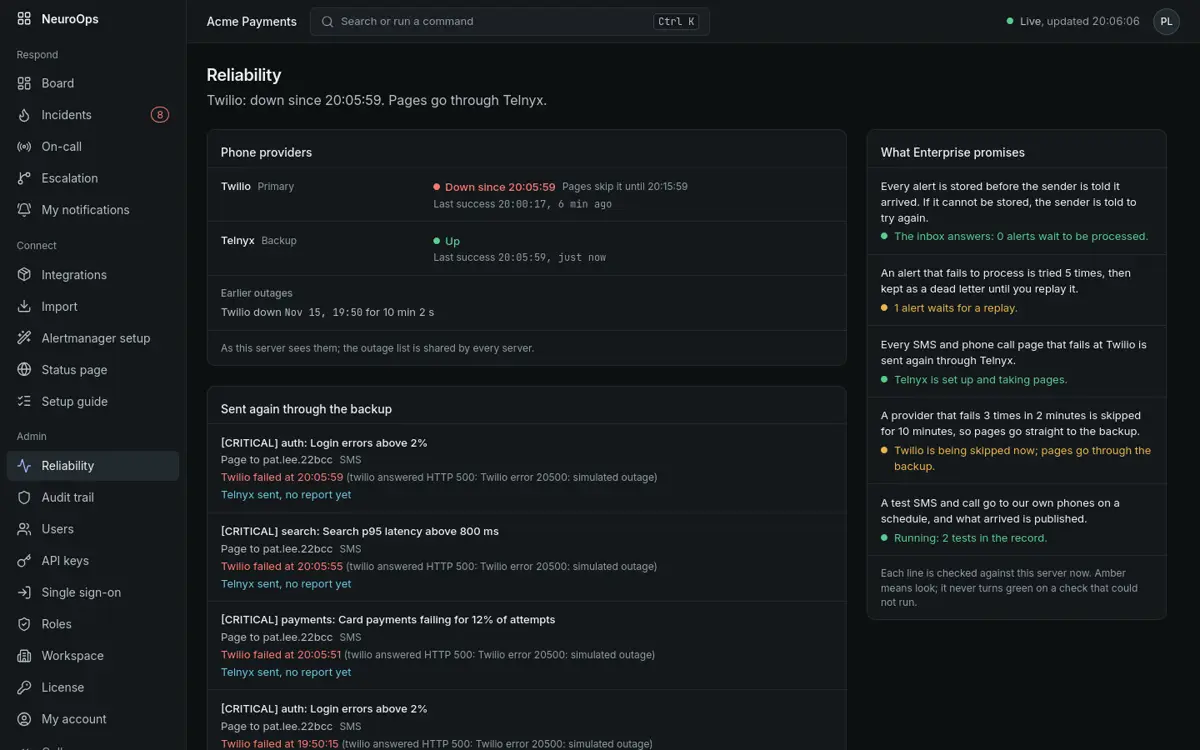
| Panel | Shows |
|---|---|
| Phone providers | Each provider as primary or backup: up, or down since when and skipped until when; the last success; earlier outages. |
| Sent again through the backup | Pages that failed at one provider and went out through the other, with the error and what the backup reported. |
| Alert inbox | Alerts waiting to be processed and dead letters, with Replay (admins). See Ingest inbox. |
| Delivery canary | The latest test SMS and calls to your own phones, numbers masked. See Delivery record. |
| What Enterprise promises | Five promises, each with a live check of this server: green when it holds, amber when you should look. |
The breaker state is "as this server sees it"; the outage list is shared by every server. The same data is at GET /api/v1/phone/status.
Run a failover drill
Prove failover before you need it. Run the drill on a staging server, or at a quiet time: during the drill every Enterprise page on that server goes through Telnyx.
- Make sure you are on call and have a verified SMS method, and that the incident's workspace has
phone.failover(Admin → License lists it). -
Point Twilio at an address that refuses connections, and restart:
TWILIO_API_BASE=http://127.0.0.1:9 -
Send a critical test alert routed to you (see Send alerts).
- Check:
- the SMS arrives from the Telnyx number;
- the incident timeline shows the Twilio attempt as failed and "sent again through Telnyx";
- after 3 failed pages within 2 minutes, Reliability shows Twilio as down and pages skipping it, and admins get the "down" notice.
- Reply 1 (if the Telnyx SMS webhook is set) or press 1 on the call. The incident is acknowledged.
- Remove
TWILIO_API_BASEand restart. The next page through Twilio closes the outage, and admins get the "back" notice.
On a workspace without failover the same drill shows the other side: 5 tries through Twilio, then the page is marked failed, and nothing goes through Telnyx.
The canary also tests each provider on its own on a schedule (CANARY_NUMBERS, CANARY_EVERY). See Delivery record.