Quickstart
Two ways to start. The cloud takes about three minutes and needs no server. Self-hosting needs one machine with Docker.
Cloud: paged in 3 minutes
-
Sign up:
Open https://app.argavon.com and choose Sign up free.
-
Confirm your email address. The link in the mail works once, for 24 hours. Opening it signs you in.
- Your new workspace starts a 30-day Enterprise trial. You don't need a card. See Plans.
- The board shows a Paged in 3 minutes panel with four steps:
- Add and verify your phone. Enter your number in international format, such as
+14155550100. You get a 6-digit code by SMS. - Send yourself a test page. Click Send me a test page. A test incident opens on the board and pages you. The panel says how long it took.
- Connect your first alert source. Pick Prometheus, Grafana or another tool and copy the token. See Send alerts.
- Invite a teammate.
- Add and verify your phone. Enter your number in international format, such as
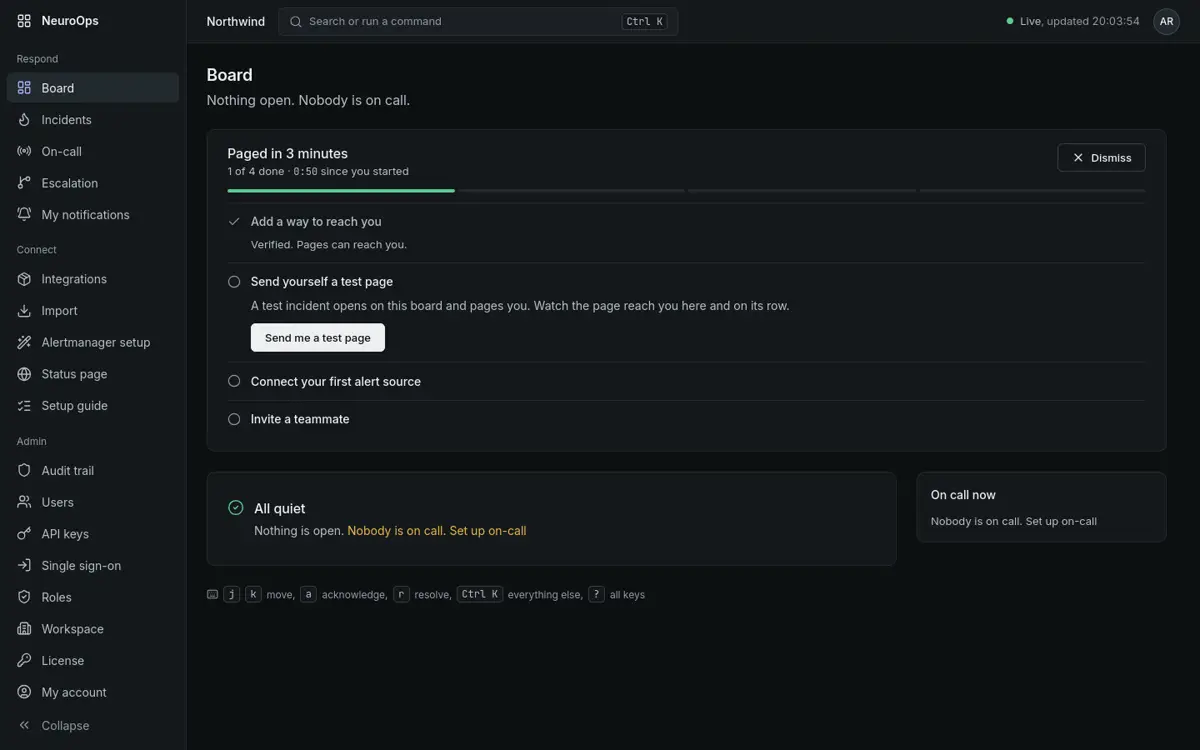
Only admins see the panel. Dismiss hides it. It stays hidden once all four steps are done.
Next, read How paging decides to see what wakes you at night and what waits for the morning.
Self-host in one line
On a Linux machine with Docker:
curl -fsSL https://argavon.com/install.sh | sh
The installer:
- checks that Docker and Docker Compose are installed;
- generates the secrets (
POSTGRES_PASSWORD,JWT_SECRET,AGENT_SECRET_KEY,MASTER_ENCRYPTION_KEY) and keeps them in.env; - starts Argavon with Docker Compose;
- prints the address to open.
It installs into ./neuroops (set NEUROOPS_DIR to change it) and ends with:
  Argavon is running: http://localhost

  Next:
    1. Open http://localhost and choose Sign up free. The first account is the
       workspace admin, so do it now, before anyone else can.
    2. Follow "Get ready to be paged": your phone, an alert source, a test page.
Open the address it prints, choose Sign up free, and create the first account. It becomes the admin of a new workspace.
A self-hosted install has no plan limits: no cap on people, SMS or calls. SMS and calls go through your own Twilio account, so set it up first: Set up Twilio. Without Twilio you can still be paged by ntfy, browser push, email, Slack or Teams.
Prefer to read the steps before you run them? The same setup is in the repository: clone it and run ./quickstart.sh. See Docker Compose. For Kubernetes, see Kubernetes (Helm).
Back up the secrets
.env holds MASTER_ENCRYPTION_KEY. Without it, stored integration secrets can't be read, even from a good database backup. Copy .env somewhere safe now. See Upgrades and backups.
Send a first alert
In the web app, open Integrations, pick Prometheus and connect it to get a source token. Then:
curl -s -X POST http://localhost/api/v1/ingest/prometheus \
  -H "X-Source-Token: $SOURCE_TOKEN" -H 'Content-Type: application/json' \
  -d '{"alerts":[{"status":"firing","labels":{"alertname":"HighErrorRate","service":"payments-api","severity":"critical"},"annotations":{"summary":"High error rate on payments-api"}}]}'
On the cloud, use your workspace address instead of http://localhost. The incident is on the board within seconds. It pages someone once an escalation route points at an on-call schedule. A critical alert is high urgency: if the person's rules include a phone call, it comes at least 2 minutes after their first SMS or push.